How to Find the Total Days Separating Two Calendar Dates
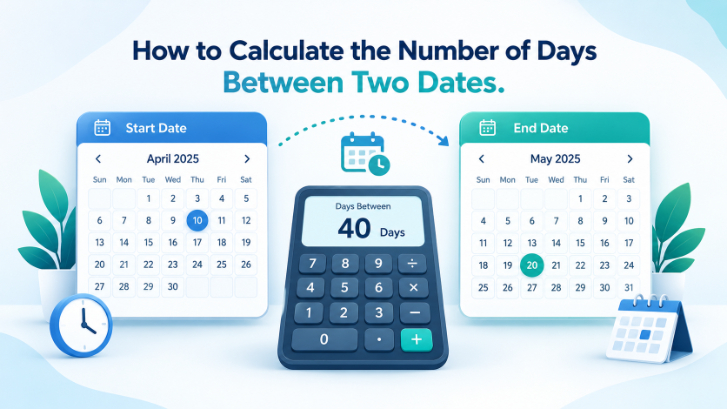
Dates help us organize almost everything, from important deadlines and travel plans to personal milestones and business schedules. But when you need to find exactly how many days separate two dates, the answer is not always obvious.
For example, how many days are there between January 15 and February 10? What if the dates belong to different years? And should you count both the starting day and the ending day?
These questions become particularly important when calculating project durations, tracking deadlines, planning events, or measuring time between appointments.
Fortunately, finding the difference between two dates is straightforward once you understand a few basic calendar rules.
In this guide, you'll learn how to calculate the number of days between two dates manually, use Excel and Google Sheets formulas, account for leap years, and decide whether to include the starting and ending dates.
What Is the Day Difference Between Two Dates?
The day difference tells you how much time passes on the calendar from a selected starting date to an ending date.
For example, consider these dates:
Start date: May 10, 2026
End date: May 21, 2026
The elapsed difference is 11 days.
This calculation does not count May 10 as a completed day. It measures the calendar days needed to move from the starting date to the ending date.
However, if you want to count every date in a period, including both May 10 and May 21, the result becomes 12 days.
Understanding this distinction is important because both calculations can be correct for different purposes.
How to Calculate Days Between Two Dates Manually
You can work out the time gap between two dates manually without relying on an online tool.
For short periods, a calendar and basic arithmetic are usually enough.
Step 1: Identify the Starting and Ending Dates
Write both dates clearly.
For example:
Starting date: January 15, 2026
Ending date: February 10, 2026
Make sure the day, month, and year are correct.
Step 2: Work Out How Many Days Are Left in the Starting Month
January has 31 days.
Subtract the starting day from the total days in January:
31 − 15 = 16 days
This represents January 16 through January 31.
Step 3: Count the Days in the Ending Month
The ending date is February 10.
Count the first ten days of February:
10 days
Step 4: Add the Results
Add the days left in January to the total number of days in February.
16 + 10 = 26 days
Therefore, the number of elapsed calendar days between January 15, 2026, and February 10, 2026, is:
26 days
This method is particularly useful when the dates fall in neighboring months.
Finding the Day Difference When Both Dates Fall Within One Month
When both dates occur in the same month and year, the calculation is much simpler.
Suppose you want to determine the difference between:
March 5, 2026, and March 19, 2026
Subtract the starting day from the ending day:
19 − 5 = 14 days
The elapsed difference is 14 days.
If your purpose is to count all calendar dates from March 5 through March 19, including both endpoints, add one.
The inclusive total becomes 15 days.
This approach works as long as both dates belong to the same month and year.
How to Work Out the Time Gap Across Two Calendar Years
Calculating across two calendar years requires a little more attention.
Consider this example:
Start date: December 28, 2026
End date: January 4, 2027
First, count the remaining days in December after December 28.
December has 31 days:
31 − 28 = 3 days
Next, count the first four days of January:
4 days
Add the two values:
3 + 4 = 7 days
The result is seven elapsed days.
For longer periods spanning multiple months or years, count the remaining days of the starting year, the full intervening years, and the days in the ending year.
A date calculator or spreadsheet can make these longer calculations faster.
How Leap Years Affect the Calculation
Leap years are an important part of accurate date calculations.
An ordinary year contains 365 days, while a leap year contains 366 days.
The additional day falls on February 29.
Under the Gregorian calendar, a year is a leap year when it is divisible by four, except that century years must also be divisible by 400.
For example, 2024 and 2000 were leap years, while 2100 will not be one.
Example: Counting Days Across February 29
Suppose the starting date is February 27, 2024, and the ending date is March 2, 2024.
Count the elapsed days:
February 28: first day
February 29: second day
March 1: third day
March 2: fourth day
The difference is 4 days.
If you forgot that February had 29 days in 2024, you would calculate the wrong result.
This is one reason why simply assuming every year has 365 days can produce errors.
How to Calculate Days Between Two Dates in Excel
Microsoft Excel makes it easy to calculate date differences, particularly when working with many entries.
Suppose you enter:
Cell A2: 15/01/2026
Cell B2: 10/02/2026
Make sure Excel recognizes both entries as dates.
Calculate the Elapsed Days
In cell C2, enter:
=B2-A2
Excel returns:
26
If the result appears formatted as a date, change the result cell's format to General or Number.
Count Both the Starting and Ending Dates
To include both dates, use:
=B2-A2+1
The result becomes:
27
Calculate the Difference Regardless of Date Order
If you simply want the absolute difference and the dates might be entered in reverse order, use:
=ABS(B2-A2)
This returns a nonnegative elapsed-day difference.
However, for deadlines and chronological records, keeping the correct date order is usually more informative.
How to Calculate Date Differences in Google Sheets
Google Sheets also supports simple date calculations.
Enter the starting date in A2 and the ending date in B2.
Then type:
=B2-A2
The result represents the elapsed difference in days.
You can also calculate the inclusive period:
=B2-A2+1
These formulas are useful for tracking appointments, deadlines, subscriptions, and project schedules.
If you have a large table of dates, copy the formula down the column to calculate multiple differences automatically.
Always check that the spreadsheet interprets your dates correctly, especially when switching between day/month/year and month/day/year formats.
How to Calculate Working Days Between Two Dates
Calendar days and working days are not the same.
Calendar days include weekends and holidays.
Working days depend on the schedule being followed.
For example, a business operating Monday through Friday may exclude Saturdays and Sundays from its working-day calculations.
Using Excel or Google Sheets
Both applications provide the NETWORKDAYS function.
If A2 contains the start date and B2 contains the end date, use:
=NETWORKDAYS(A2,B2)
This counts weekdays from Monday to Friday and includes eligible starting and ending dates.
You can also supply a range of holidays to exclude.
For workplaces with different weekend schedules, functions such as NETWORKDAYS.INTL provide additional options.
Remember that public holidays vary by country and region, so the correct holiday calendar matters.
Age Calculator
Calculate your exact age in years, months, and days.
When Should You Use an Online Date Calculator?
An online date calculator can be convenient when you need a quick answer without opening a spreadsheet.
A typical calculator asks for a starting date and an ending date.
After entering the dates, the tool displays the number of days between them.
Some calculators also allow you to include both dates, exclude weekends, or show the difference in weeks.
Before relying on the result, check which counting method is being used.
A calculator showing 11 days and another showing 12 days may simply be using different endpoint rules.
For an important calculation, verify both the dates and the selected counting options.
Calendar Days vs Exact 24-Hour Periods
There is another distinction worth understanding.
The number of calendar days between two dates is not always the same as the number of complete 24-hour periods between two timestamps.
For example, a date-only calculation from Monday to Tuesday usually gives one calendar day.
However, if the starting timestamp is Monday at 11:00 p.m. and the ending timestamp is Tuesday at 1:00 a.m., only two hours have passed.
Daylight saving time changes can also cause some local calendar days to contain 23 or 25 hours.
If your task involves precise hours, use a timestamp calculation with an appropriate time zone rather than a date-only calculator.
For ordinary deadlines and schedules, calendar-day counting is often sufficient.
Where Are Date Difference Calculations Useful?
Knowing the number of days between two dates can help with many everyday tasks.
Project planning: Calculate how long remains before an important deadline.
Travel arrangements: Determine the number of calendar days in a trip, while remembering that hotel nights are counted differently.
Event planning: Check how many days remain before a wedding, meeting, or celebration.
Subscription tracking: Measure the time between a service's start and renewal dates.
Financial calculations: Identify calendar-day periods used in certain interest or billing calculations, following the applicable contract.
Personal milestones: Count the days between memorable events or important dates.
In each case, choose the method that matches the purpose.
Common Mistakes When Counting Days Between Dates
Even a simple date calculation can produce incorrect results if important details are overlooked.
Using the wrong date format: A value such as 04/06/2026 may represent April 6 or June 4, depending on the system.
Forgetting leap years: February 29 changes the number of days in certain periods.
Confusing inclusive and elapsed counting: Counting both endpoints adds one day to the ordinary date difference.
Treating all months as 30 days: Actual month lengths vary.
Ignoring weekends: Business-day calculations require different rules from calendar-day calculations.
Forgetting holidays: A weekday is not necessarily a working day for every organization.
Using timestamps without checking time zones: Exact elapsed hours can differ from the calendar-day count.
Carefully checking these details helps produce a result that suits your intended use.
Frequently Asked Questions
How do I calculate the number of days between two dates?
Subtract the starting date from the ending date using a calendar, spreadsheet, or date calculator. For longer periods, account for actual month lengths and leap years.
Does counting days between dates include the starting date?
Ordinary elapsed-day calculations do not add the starting date as an extra day. Inclusive counting adds one when both endpoints are included.
How many days are between January 15 and February 10, 2026?
There are 26 elapsed calendar days between those dates, or 27 days when counting both endpoints.
Can I calculate days between dates without an online tool?
Yes. Count the remaining days in the first month, add the days in any complete intervening months, and then add the days in the ending month.
How do I calculate days between dates in Excel?
Enter two valid dates in separate cells and subtract the starting date from the ending date. For example, use =B2-A2.
Can I exclude Saturdays and Sundays?
Yes. In Excel or Google Sheets, NETWORKDAYS counts weekdays using a standard Monday-to-Friday workweek.
Does a leap year affect the number of days between dates?
Yes, if the period includes February 29. Leap years contain 366 days instead of 365.
What happens if both dates are the same?
The elapsed difference is zero days. Inclusive counting of that single date gives one day.
Final Thoughts
Calculating the number of days between two dates becomes easier once you understand how calendar-day differences work.
For short periods, basic subtraction may be enough. For dates in different months or years, you need to account for actual calendar lengths and leap years.
Excel, Google Sheets, and online date calculators can simplify the process, especially when dealing with multiple dates or lengthy periods.
The most important consideration is deciding whether you need elapsed calendar days, inclusive days, working days, or exact elapsed time.
By selecting the correct counting method and checking your dates carefully, you can calculate day differences accurately and confidently.